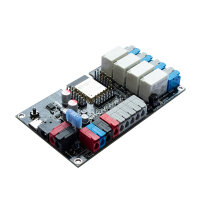
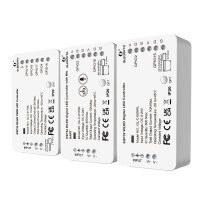
GLEDOPTO GL-DR-010WL – WLED DIN Rail Controller for Digital LED Strips
Control digital LED lighting via WiFi and mount the controller neatly on a DIN rail. The GLEDOPTO GL-DR-010WL combines ESP32-based WLED control with a housing designed for organised installation. Suitable for compatible addressable LED strips operating at 5 V, 12 V or 24 V DC.
GLEDOPTO · GL-DR-010WL · ESP32 WLED Controller
WLED & WiFi
5 / 12 / 24 V DC
DIN Rail Mounting
2 Data Outputs
01 · MOUNTING
Organised DIN rail installation
The DIN rail housing makes it easy to mount the controller neatly inside a suitable installation enclosure. Ideal for LED projects requiring an organised control setup.
02 · CONTROL
Operate WLED via WiFi
Configure and operate the controller through the WLED web interface or a compatible WLED app. Basic functions are also accessible using the OPT button directly on the controller.
03 · CONNECTIONS
Two digital data outputs
GPIO16 and GPIO2 are available for controlling compatible digital LED strips. GPIO16 is the default output, while GPIO2 can be configured for additional use when required.
04 · COMPATIBILITY
Supports various LED chip types
The GL-DR-010WL supports WS2811, WS2812, WS2812B and SK6812, among other LED chips. Supply it with 5 V, 12 V or 24 V DC to match the connected LED strip.
Digital LED lighting with WLED and DIN rail mounting
The GLEDOPTO GL-DR-010WL is suitable for addressable LED installations where the controller needs to be mounted centrally and neatly. Its DIN rail housing integrates into suitable installation setups and keeps the controller organised and accessible.
Use the WLED interface to configure the LED type and data outputs. You can then operate your lighting via WiFi using a browser or a compatible WLED app. Typical applications include decorative lighting, furniture illumination and colourful accents in gaming or media areas.
Two data outputs are available: GPIO16 is the preferred default output, while GPIO2 can be used additionally after configuration. Each connected LED strip requires one data output and a suitable power supply.
The OPT button provides on/off control, colour changes and a reset function directly on the device. The housing is made from flame-retardant polycarbonate, and the connection terminals accept conductor cross-sections from 0.5 to 2.5 mm².
- ESP32-based WLED controller for digital LED strips
- DIN rail mounting for an organised installation
- WiFi communication for configuration and operation
- Two data outputs via GPIO16 and GPIO2
- Operation with 5 V, 12 V or 24 V DC
- Maximum total input current of 10 A
Typical applications
The GL-DR-010WL is suitable for compatible digital LED strips in dry indoor environments.
Furniture and shelving
Control addressable LED strips for decorative lighting on shelves, in display cabinets and in custom furniture.
Gaming and media areas
Use WLED to operate colourful lighting accents around desks, gaming setups and media furniture.
Decorative lighting
Use digital LED strips for individual lighting designs and indoor lighting effects.
DIN rail installations
Mount the controller neatly inside a suitable installation enclosure and keep your LED control system centrally accessible.
WLED control via WiFi, browser and app
The GL-DR-010WL is configured and operated via WiFi. For initial setup, connect to the controller's WiFi access point, then enter the credentials for your preferred WiFi network.
The WLED web interface allows you to configure the LED type and data outputs. To discover the controller using a compatible WLED app, your smartphone and controller must be connected to the same WiFi network.
Ensure sufficient WiFi reception at the installation location. Metal-shielded enclosures can significantly impair the wireless connection.
WiFi · WLED Web Interface · WLED App
Technical specifications – GLEDOPTO GL-DR-010WL
Key connection and operating specifications for planning your digital LED installation.
| Brand |
GLEDOPTO |
| Model |
GL-DR-010WL |
| Product type |
WLED DIN rail controller for digital LED strips |
| Controller platform |
ESP32 |
| Mounting type |
DIN rail mounting |
| Input voltage |
5 / 12 / 24 V DC |
| Maximum input current |
10 A total |
| Communication |
WiFi |
| Operation |
WLED web interface, compatible WLED app and OPT button |
| Data outputs |
2: GPIO16 and GPIO2 |
| Default data output |
GPIO16 |
| LED connections |
V+, GPIO16 or GPIO2, GND |
| Supported LED chips |
WS2811, WS2812, WS2812B, FL19038, SK6812, SM16703P, SM16703SP3 |
| Housing material |
Flame-retardant polycarbonate (PC) |
| Temperature range |
−20 to +45 °C |
| Conductor cross-section |
0.5 to 2.5 mm² |
| Wire stripping length |
9 to 10 mm |
| OPT button |
Short press: on/off; hold for 1 second: change colour; hold for 10 seconds: reset |
Note: The 10 A rating refers to the maximum input current of the entire controller. The power supply voltage must match the connected LED strip. Microphone functionality is not explicitly confirmed for the GL-DR-010WL.
Installation and initial setup
- Disconnect the power before making any connections. Supply the controller with suitable DC power at 5 V, 12 V or 24 V.
- Mount the GL-DR-010WL on a suitable DIN rail. Choose a dry location away from direct sunlight and observe the temperature range of −20 to +45 °C.
- Ensure sufficient WiFi reception. Avoid metal-shielded installation locations and strong magnetic fields.
- Use conductors with a cross-section of 0.5 to 2.5 mm² and strip 9 to 10 mm of insulation. Check the polarity and ensure all connections are secure.
- Connect V+ to VCC, GPIO16 or GPIO2 to DATA, and GND to GND on the digital LED strip. Use one data output per LED strip.
- Prefer GPIO16 as the default output. Configure the second data output, GPIO2, in WLED before using it.
- Power on the controller and connect to the WiFi network “WLED-AP”. The default password is “wled1234”. If the setup page does not open automatically, enter 4.3.2.1 in your browser.
- Enter your WiFi credentials under “WIFI SETTINGS” and select “Save & Connect”.
- Under “Config” → “LED Preferences” → “Hardware setup”, configure the connected LED type and the outputs being used.
- To add the controller in a compatible WLED app, connect your smartphone to the same WiFi network and search for available WLED devices.
Frequently asked questions about the GLEDOPTO GL-DR-010WL
Which LED strips are compatible with the GL-DR-010WL?
The controller supports digital, addressable LED strips using WS2811, WS2812, WS2812B, FL19038, SK6812, SM16703P and SM16703SP3 chips. Configure the correct LED type in WLED and ensure the supply voltage matches the connected LED strip.
What voltage does the controller require?
The GL-DR-010WL can operate with 5 V, 12 V or 24 V DC. Use a supply voltage that matches the connected LED strip.
Can I connect two digital LED strips?
Yes. The controller has two data outputs: GPIO16 and GPIO2. GPIO16 is the default output, while GPIO2 can be used additionally after configuration. Each LED strip uses one data output.
Is 10 A available at each output?
No. The 10 A rating refers to the maximum input current of the entire controller. A capacity of 10 A per output is not specified.
How do I operate the GL-DR-010WL?
Use the WLED web interface or a compatible WLED app over WiFi. The OPT button also allows you to switch the lighting on and off and change the colour.
Can the controller be installed inside a metal enclosure?
Metal-shielded enclosures can significantly impair WiFi reception. Choose an installation location or suitable enclosure that allows a reliable wireless connection.
How do I reset the GL-DR-010WL?
Press and hold the OPT button for 10 seconds, then release it. Alternatively, open “Config” and “Security & Updates” in WLED, enable “Factory reset” and confirm with “Save”.
Product safety information
Manufacturer information:
GLEDOPTO CO., LTD
F2 Bldg #1, Wanda Industrial Park, No.56 Baolong Hi-Tech Avenue, Baolong street
Shenzhen, China, 518116
sales@gledopto.com
https://gledopto.com
Responsible person:
LED Trading
Schöneicher Straße 42
Brandenburg
Schöneiche, Deutschland, 15566
info@led-trading.de
https://www.led-trading.de
| Item information |
Value |
| Shipping weight: |
0,06 kg
|
| Item weight: |
0,06 kg
|